How to Backtest on MT4 and MT5 by Hand
How to backtest on MT4 and MT5 by hand with F12, what MetaTrader's own help says the Strategy Tester is for, and what the hand method never records.
To backtest on MT4 or MT5 by hand, switch off the chart's auto-scroll, rewind to a date you have not studied, and press F12 to advance the chart one candle at a time, taking your setups as they appear. It needs nothing beyond the terminal and the history already on your chart. Nothing about it is recorded, though: MetaTrader places no order, keeps no result and gives you no report.
MetaTrader's Strategy Tester is documented by MetaQuotes as a tool for Expert Advisors rather than for a person taking trades.
How do you backtest on MT4 or MT5?
There are three routes inside MetaTrader, and they record very different amounts.
| Route | What it does | What it records |
|---|---|---|
| F12 on a normal chart | Steps the chart forward one candle at a time so you can read it as if it were live | Nothing. No order is placed and no result is stored |
| Strategy Tester in visual mode | Runs a test over a chosen period on a chart you can pause, speed up, slow down, or jump to a date in | The Expert Advisor's positions, orders and deals, in the Toolbox window |
| Strategy Tester without visual mode | Runs an Expert Advisor over the period and reports the outcome | A full report for the Expert Advisor |
The F12 rows come from the mql5.com community blog post and from forexschoolonline.com, and the Strategy Tester rows from MetaQuotes' own Strategy Testing help page.
Which route you want depends on what you are actually testing. A rule set a machine can execute belongs in the Strategy Tester. A discretionary read, where you decide what counts as a setup, belongs on a chart you step forward yourself.
What is MetaTrader's Strategy Tester actually for?
For Expert Advisors, and its own documentation says so in its first line: "The Strategy Tester allows you to test and optimize trading strategies (Expert Advisors) before using them for live trading."
The features it documents are aimed at automated runs. Four tick generation modes, from every tick simulated down to open prices only, with a mode that uses real ticks stored by your broker where "Testing is performed using real ticks of financial instruments, accumulated by brokers. No simulation is performed." Network delay emulation. Forward testing, which splits your date range in two and checks the second half with the parameters chosen on the first, a feature the page says "allows you to avoid parameters fitting in certain areas of historical data". And the MQL5 Cloud Network, for spreading runs across remote agents.
Visual testing is described as watching what the robot does, rather than as replaying a chart for yourself. The help states that "This mode allows to visualize exactly how the Expert Advisor performs trade operations during backtesting", and that "The main purpose of this type of testing is the visual analysis of the Expert Advisor performance."
Third parties describe it differently. nordfx.com's step for opening the tester tells you to select Strategy Tester, and notes that MT5 also offers a Replay Mode, and fortraders.com describes loading an expert, ticking visual mode and then trading the tester's chart yourself with the mouse. We have not tried those steps, so treat the MetaQuotes wording as the documented behaviour and theirs as their own.
How do you backtest manually on MT4 and MT5, step by step?
Seven steps, and the hotkey does most of the work.
- Open the chart for the pair and timeframe you want to test.
- Switch off auto-scroll. forexschoolonline.com's first instruction is to switch the "Scroll the chart to the end" button off on your MetaTrader charts, or price keeps rolling back to live prices.
- Check you have history that far back. If not, open the History Center with F2 to download or import the data for the pair, which is where the mql5.com post starts.
- Rewind. Drag the chart with the mouse, or use the left arrow key.
- Press F12 to step forward. The mql5.com post states it exactly: "F12 moves the chart forward by 1 candlestick at a time. To move the chart backward by 1 candlestick at a time, hit Shift+F12." forexschoolonline.com adds what happens if you keep it pressed: "If you hold this key price will begin to roll forward. If you hold F12 and Shift price will move backwards."
- When a setup appears that meets your rules, mark your entry, stop and target on the chart, and write them down before you advance.
- Step forward to the outcome, and record what happened.
For measuring distances as you go, the mql5.com post suggests the crosshair, reached by clicking the mouse wheel or with Ctrl+F.
One note on that post. It dates from 28 June 2016, which makes it about ten years old. The hotkeys in it still match what forexschoolonline.com describes today.
Is backtesting on MetaTrader free?
The Strategy Testing help page names no price for the tester, and the F12 method needs nothing beyond the terminal and the history already on your chart.
Real tick testing depends on the archive your broker keeps, and fortraders.com warns that a thin archive falls back to generated ticks without a loud warning, so the modelling quality figure can flatter a test built on gaps. And the one guide that walks MT4's tester in detail, blueberrymarkets.com, routes it through Tick Data Suite, a separate tool it describes as giving "access to high-quality tick data for accurate backtesting".
Do you have enough history, and how do you get more?
Probably not on a fresh install, and the fix is the History Center. The mql5.com post's advice is to open it with F2 and download or import the data you need, and to save time and disk space by downloading only the timeframes you will actually test.
The practical limit is that what you get depends on your broker's server. That is a different thing from a platform that ships its history with it, and it is one reason two traders running the same test on the same pair get different numbers.
What does the hand method not give you?
A record. Stepping a chart with F12 is a reading exercise, and everything that turns a reading exercise into a test has to be built by you, outside the platform.
What F12 does not do:
- No order is placed, so there is no fill price
- No P&L, no balance curve, no drawdown
- No statistics of any kind at the end
- No spread, commission, swap or slippage applied to anything
- No log, unless you keep one yourself
The pages that teach the method are uneven on that last point. forexschoolonline.com does send you to a journal, saying the best way to get the most out of backtesting is with your trading journal. The mql5.com post goes the other way: its advice is that "A faster way to backtest is to skip plotting or measuring anything at all, unless you need to", and it never says where the results should end up.
Fast is useful when you are drilling pattern recognition. It stops being useful the moment you want to know whether the strategy made money, because an unrecorded test cannot answer that.
Is MT4 or MT5 better for backtesting?
For the hand method there is very little in it. The F12 and Shift+F12 hotkeys work the same way on both, which is why forexschoolonline.com covers them together under one heading.
For the tester, the documented feature sets differ. MT5's own help describes real-tick testing, four tick generation modes, network delay emulation and forward testing on the platform itself. The one guide that details the MT4 tester in full reaches for a third-party tick data tool to get comparable data. fortraders.com adds a limit worth knowing either way: it describes the Strategy Tester as desktop only, saying the MT5 web terminal and mobile apps do not include it.
Which is better depends on whether your test needs any of that. If you are stepping a chart by hand, it needs none of it.
What do you do about spread, commission and swap?
In the hand method nothing happens automatically, so you apply them yourself when you write the trade down. In the tester they are settings, and the pages that go into them agree that the settings decide the result.
fortraders.com describes the tester's spread field as having three modes, current, fixed, or historical variable, and argues that for a variable-spread account the honest option is real ticks with the historical bid and ask in them rather than a flat number. blueberrymarkets.com's MT4 walkthrough enables variable spread and slippage in Tick Data Settings and enters the broker's commission so that transaction costs are modelled.
For a hand test the workable version is simpler: decide a cost per trade before you start, in pips or in currency, and subtract it from every result including the winners. A test that ignores costs looks better than the account would.
This is one reason a backtest and a live account diverge. Our article on backtesting accuracy, slippage and data quality goes into why.
What goes wrong when people do this?
Hindsight, and the mechanics of the method invite it. To rewind a chart with F12 you first have to scroll back through it, which means you have already seen the stretch you are about to test. fortraders.com calls that hindsight leakage, says it quietly inflates your win rate, and suggests the discipline of deciding first and advancing afterwards, never the other way round.
Three more:
- Holding F12 down past the decision. One long press and you have seen the outcome before you committed to the trade.
- Skipping the log, because the method makes it optional. A hundred trades you did not write down is a hundred trades you cannot analyse.
- Testing one pair in one market condition and reading it as a result. A trending stretch flatters a trend strategy.
A partial fix for the first one: never test on history you have already scrolled through in the same sitting, and split your dates so that some of them are genuinely unseen. ChartLabs does that as a built-in split, keeping Training and Verification session results separate in analytics, so the number from data you had not traded before sits next to the number from data you had.
What are the alternatives if the hand method is not enough?
When you want the reading practice and the record, you need something that places real orders as you step the chart.
ChartLabs is a manual backtesting platform built for that loop. You replay historical charts bar by bar and take practice trades as if the market were live, in the browser, with nothing to install and no data to download. Orders are real orders in the replay rather than lines drawn on a chart, and per-symbol commission and slippage feed every trade's P&L, balances and analytics. Each trade takes a note, written in the Orders panel or from a button on the chart while the trade is still open, and that note comes through in the CSV export. The Orders panel also shows up to five tags per trade, which is how you keep one kind of setup separate from another in the analytics.
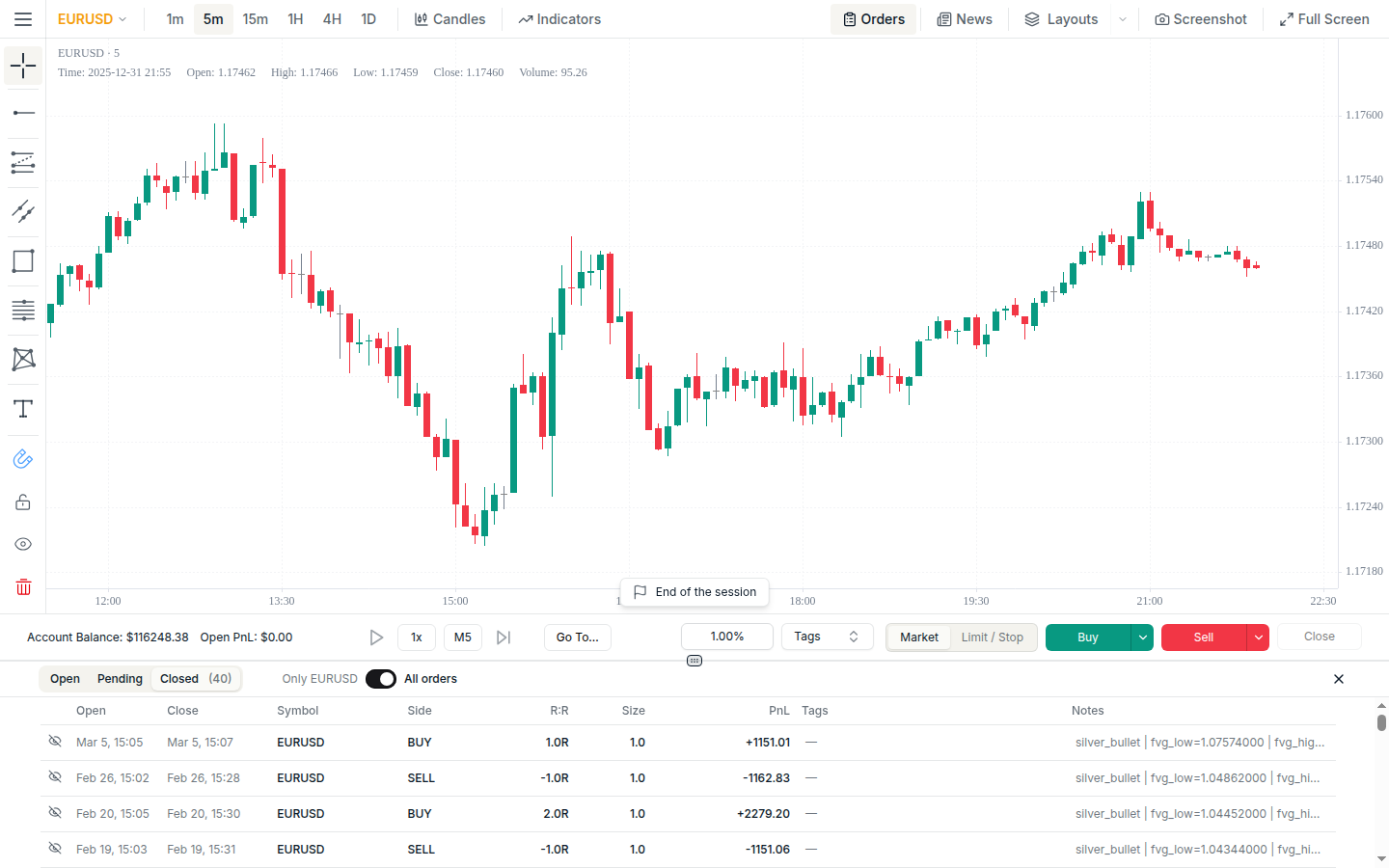
Markets are forex, indices, commodities including gold and oil, and crypto, with no futures contracts. Data comes from Dukascopy, tick-level where it is available, cleaned to remove anomalies and converted to 1-minute candles as the lowest timeframe. History reaches up to around 22 years on the oldest forex pairs, with other instruments starting later. One plan, $20 a month or $200 a year.
For the wider field, see free backtesting software.
New to the whole process, our beginner's guide to backtesting a trading strategy walks it end to end, and manual vs automated backtesting covers what each approach can and cannot tell you.
Try the hand method first, on any chart you already have. When you want the trades recorded instead of remembered, you can start a free trial of ChartLabs.
Tags
Related
Manual vs Automated Backtesting: Which One Should You Use?
Automated backtesting tells you whether a set of rules made money. Manual backtesting tells you whether you can trade them. A practical comparison of what each one tests, what it costs you in time and skill, and which to reach for first.
Backtesting a Trading Strategy: A Beginner's Guide
What backtesting is, why it matters, and how to run one step by step: defining your rules, choosing clean historical data, stepping through the chart trade by trade, logging results, and reading the metrics that tell you whether your strategy has a real edge.
Backtesting Accuracy: How Slippage and Data Quality Matter
Why backtest results and live results drift apart, and what actually closes the gap: clean tick data, honest spread assumptions, and commission and slippage modelled directly on every trade you log.